
Download the Weekly Taskinator | Download fillable pdf version
Planning your day – day by day – might be a short time horizon for some, but a month is too long as well. This is why we developed – The Weekly Taskinator; your one week planner to keep you focussed on important Projects you want to achieve for each day of the week. [Click for the tutorial]
How to use The Weekly Taskinator ?
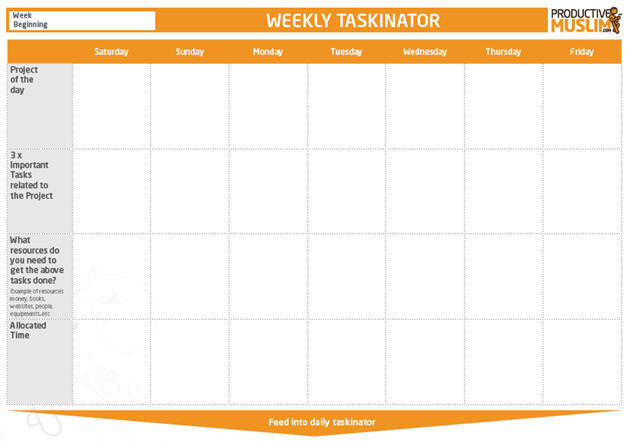
There are 4 important rows for you to fill in:
1. Project of the Day:
This is where you decide on the MOST IMPORTANT project you need to work on for that day. This must be a project that excites you, or at least will make substantial contribution to your personal or career development.
2. Three Important Tasks:
Once you’ve decided on the project. The next step is to decide on 3 important tasks that would contribute towards completing the project. Make these tasks as specific and achievable as possible, e.g. Let’s say your project of the day is to complete an important work assignment, your 3 x important tasks may include, writing 3 chapters of the report, contacting certain key people, holding meetings with 1 major stakeholder.
3. Resources needed:
You have your project, and you have your tasks, next is decide on resources. You do not want to be stuck on the day of your project with lack of key resources to help you achieve your tasks, resources can include people you need to meet, documents you need to take with you from work/home, finances (e.g. cash for a road trip if that’s your project of the day). You want to make sure that nothing stands between you and achieving your tasks and ideally as you think of resources you’ll start preparing for them in advance at least a day before.
4. Allocated Time:
With the above in place, you can now give yourself a reasonable estimate of how long it’ll take you to work on your projects. This information would be key to feed into your daily taskinator. (note: the best time to schedule your project of the day is in the early hours of the morning, avoid the temptation to procrastinate delivering on your important project to a later part in the day, it’ll be harder for you to work on your project as you’ll get busier as the day progresses and you’ll only get frustrated. Do it first thing in the morning and you’ll have a great sense of achievement right from the start of your day).
Download the Weekly Taskinator | Download fillable pdf version
Now Available in MS EXCEL format (Special thanks to Br.Ahmad Noaman for converting into excel format)
View the tutorial on how to use ProductiveMuslim Weekly Taskinator: